파일 import 통제하기
순서까지 통제해야 하는가?
1) git diff 오염
“이전 커밋과 현재 코드의 달라진 부분”을 보여주는 기능.
파일 수정과 무관한 import 순서만 바뀌어도 diff가 덩어리째 변해 중요하지 않은 부분이 강조됨.
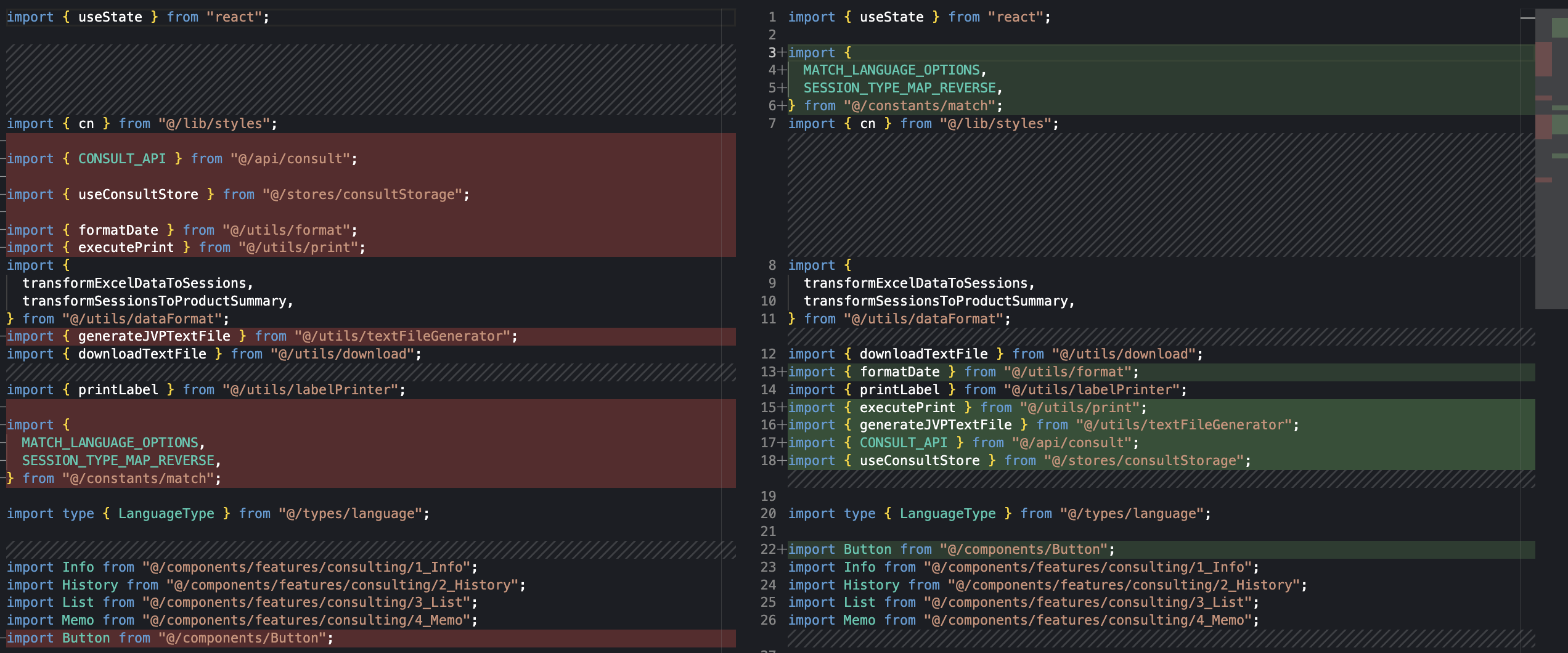
이 불필요한 노이즈 변경이 히스토리를 더럽힘
2) merge conflict 발생
두 개발자가 같은 파일을 다른 시점에 수정하는 상황.
- A는 상단 import를 하나 추가했음
- B는 같은 상단에서 import 순서를 살짝 손봤음
이렇게만 해도 Git은 “같은 라인 또는 인접한 라인을 동시에 고쳤다”고 판단하고 conflict를 만들어버린다.
3) 일단 마음이 편하다
1
2
3
4
5
6
7
import { Something } from '../../shared/Something';
import React from 'react';
import { useQuery } from '@tanstack/react-query';
import { Button } from '@/components/Button';
import { useState } from 'react';
import { COLUMNS } from "../constants/table";
import { helper } from '../utils/helper';
1
2
3
4
5
6
7
8
9
import React, { useState } from 'react';
import { useQuery } from '@tanstack/react-query';

import { Something } from '@/shared/Something';
import { helper } from '@/utils/helper';
import { COLUMNS } from "@/constants/table";

import { Button } from '@/components/Button';
적용
1) 절대 경로 적용
import 경로를 @/~형태로 통일하는 방법.
- Vite 설정: 실제 빌드/개발 서버에서 경로 해석
1
2
3
4
5
6
7
8
9
10
11
12
13
// vite.config.ts
import react from "@vitejs/plugin-react";
import path from "path";
import { defineConfig } from "vite";

export default defineConfig({
  plugins: [react()],
  resolve: {
    alias: {
      "@": path.resolve(__dirname, "./src"),
    },
  },
});
- TypeScript 설정: IDE 자동완성 및 타입 체크
1
2
3
4
5
6
7
8
9
10
// tsconfig.app.json
{
  "compilerOptions": {
    "baseUrl": ".",
    "paths": {
      "@/*": ["./src/*"]
    }
  },
  "include": ["src"]
}
2) import 순서 제어
- 패키지 설치
1
pnpm add -D eslint-plugin-simple-import-sort eslint-plugin-import
eslint-plugin-simple-import-sort: eslint-plugin-import보다 단순하고 강제력 강한 자동정렬.
설정은 최소로 하고 자동 정렬은 강력해야 하는 경우 simple-import-sort가 더 유리하다.
- eslint config 수정
1
2
3
4
5
6
7
8
9
10
11
12
13
14
15
16
17
18
19
20
21
22
23
24
25
26
27
28
29
30
31
32
33
34
35
36
37
38
39
40
41
42
43
44
45
46
47
48
49
50
51
52
53
54
55
56
57
58
59
60
61
62
63
64
65
66
67
68
69
70
71
72
// eslint.config.ts
// ...
import simpleImportSort from 'eslint-plugin-simple-import-sort'
import importPlugin from 'eslint-plugin-import'

export default defineConfig([
  globalIgnores(['dist']),
  {
    // ...
    plugins: {
      'simple-import-sort': simpleImportSort,
      'import': importPlugin,
    },
    rules: {
        "simple-import-sort/imports": [
        "error",
        {
          groups: [
            // 1. side effect import
            ["^\\u0000"],

            // 2. React & 외부 라이브러리
            ["^react", "^@?\\w"],

            // 3. 내부 핵심 모듈 (의존성 계층)
            [
              "^@/types(/|$)",
              "^@/(constants)(/|$)",
              "^@/(lib)(/|$)",
              "^@/(utils)(/|$)",
              "^@/(api)(/|$)",
              "^@/(stores)(/|$)",
              "^@/(hooks)(/|$)",
            ],

            // 4. 컴포넌트 + 기타 내부 모듈
            ["^@/components(/|$)", "^@/app(/|$)"],

            // 5. 상대 경로
            [
              "^\\.\\.(?!/?$)",
              "^\\.\\./?$",
              "^\\./(?=.*/)(?!/?$)",
              "^\\.(?!/?$)",
              "^\\./?$",
            ],

            // 6. 스타일 & Assets
            [
              "^@/styles(/|$)",
              "^.+\\.(css|s[ac]ss)$",
              "^@/(assets)(/|$)",
              "^.+\\.(svg|png|jpe?g|gif|webp)(\\?react)?$",
            ],

            // 7. 테스트 & 스토리북 & 모의 데이터
            [
              "^@/test-utils(/|$)",
              "^@/storybook(/|$)",
              "^@/mocks(/|$)",
              "^.+\\.(stories|story)\\.[tj]sx?$",
            ],
          ],
        },
      ],
      "simple-import-sort/exports": "error", // export 구문도 알파벳 순으로 정렬
      "import/first": "error", // import 구문을 파일 최상단에
      "import/newline-after-import": "error", // import 블록 다음은 빈 줄
      "import/no-duplicates": "error", // import 구문은 중복되지 않음
    },
  },
])
순서를 정하는 규칙에 대해서는 후술한다.
- IDE 설정
1
2
3
4
5
6
7
8
9
10
11
12
13
// .vscode/settings.json
{
  "editor.formatOnSave": true,
  "editor.codeActionsOnSave": {
    "source.fixAll.eslint": "explicit"
  },
  "eslint.validate": [
    "javascript",
    "javascriptreact",
    "typescript",
    "typescriptreact"
  ]
}
이후 formatOnSave(저장 시에 lint 규격 적용)가 동작한다.
- 전체 파일에 일괄 적용
1
pnpm lint --fix
3) 순서를 정하는 규칙
simple-import-sort가 그룹 안에서 알파벳까지 자동 정렬을 수행하기 때문에,
이 import 구문이 어느 그룹에 속하는지만 정하면 된다.
핵심 1: 멀리 있는 것 → 가까운 것 → 사소한 것
핵심 2: 의존성이 적은 것 → 많은 것
변경이 발생해도 import 블록의 하단부에서 발생하는게 유리하다.
따라서 의존성이 많은 것을 하단부에 위치시킨다.
예시 1: 라이브러리(외부 세계) → 우리 앱의 큰 구조(alias) → 스타일/이미지(꾸밈 요소)
예시 2: 상수 → 유틸리티 → 외부 통신 → 상태 관리 → React 계층
특이사항은, 타입도 코어 의존성의 한 부분으로 취급하여 ^@/types(/|$)로 정렬을 수행하는 구조.
타입 정의가 프로젝트에서 꽤 중요한 역할을 한다면 별도로 관리하는 것도 괜찮을 듯.